
Restaurant management software that connects recipes, ingredient costs, allergens, staff involvement and sales.
Challenge
Restaurant teams need to know what each dish costs and earns, but ingredient prices, recipe quantities, staff time, operating expenses and sales often sit in separate spreadsheets.
Solution
A single application that connects recipe development with financial visibility, helping restaurants understand portion costs, estimated gross profit and the impact of their menu decisions.
Technologies and tools
Web application, Python / FastAPI, JavaScript, SQLite for local use, PostgreSQL deployment support, Excel and CSV import, English and Romanian interfaces.
Built for restaurants, bistros and kitchen teams
duFromage brings recipe management and restaurant numbers into the same workspace. It is designed for owners, managers and chefs who want to understand the economics of a dish while keeping ingredients, allergens, menus and team involvement organized.
The starting point is practical: a recipe should tell you more than how to cook it. It should also help you decide how to price it, which costs need attention and whether your current team can realistically produce it.
Challenge: a popular dish is not always a profitable dish
A selling price can look healthy while ingredient costs, preparation time and operating expenses absorb much of the margin. When recipe and financial information are disconnected, it becomes harder to spot that difference before the dish reaches the menu.
- Ingredient purchase prices need to be translated into quantities used by each recipe.
- Batch quantities and serving counts must be converted into useful portion costs.
- Staff involvement adds costs that are easy to overlook when pricing a dish.
- Monthly expenses such as rent, energy, water and waste collection affect the overall picture.
- Allergens need to stay visible when ingredients or recipes change.
- Sales totals alone do not explain which dishes perform well over a selected period.
Solution: one workspace, connected decisions
duFromage connects an ingredient library, a dish editor, menu management, staff information, sales records and financial reporting. The same underlying data supports both day-to-day administration and the calculations used to evaluate a new recipe.
The dashboard gives users a view of revenue, ingredient costs, payroll, operating expenses and gross profit for a chosen date range. It also highlights sales activity, monthly totals and dish margins, making it easier to move from a headline number to a specific menu decision.
The dashboard brings sales and costs together, with a selectable reporting period and monthly performance summaries.
Recipe economics, visible while you edit
As users build a dish, duFromage combines ingredient quantities, servings, selling price, staff involvement and allocated operating expenses. The editor presents the calculation in a clear sequence: selling price minus ingredients, labor and other expenses, leading to estimated gross profit per portion.
Operating expenses are allocated using preparation time and configurable working-day hours. When the current month has no expense data, the calculation uses the latest available previous month. Staff roles and involvement minutes help estimate the labor required for a complete batch.
An Insights section turns those inputs into decision support:
- Break-even selling price per portion.
- Estimated gross profit margin and profit for a complete batch.
- Selling price needed for a 30% gross margin.
- Estimated profit if ingredient costs rise by 20%.
- The ingredient with the largest share of recipe cost.
- Estimated portions producible with the current staff during a working day.
- Warnings about missing costs, staff rates or involvement timings.
These figures are planning estimates based on the data entered. Production capacity considers current staff and shared skills; actual shifts, competing dishes and equipment constraints can reduce achievable output.
The dish editor shows the cost calculation alongside practical insights for pricing and production planning.
Ingredients, nutrition and allergens in context
The ingredient library stores purchase information, quantities, units, nutritional values and declared allergens. Recipes use that information to calculate ingredient costs and nutritional totals, with views per serving or per 100 grams.
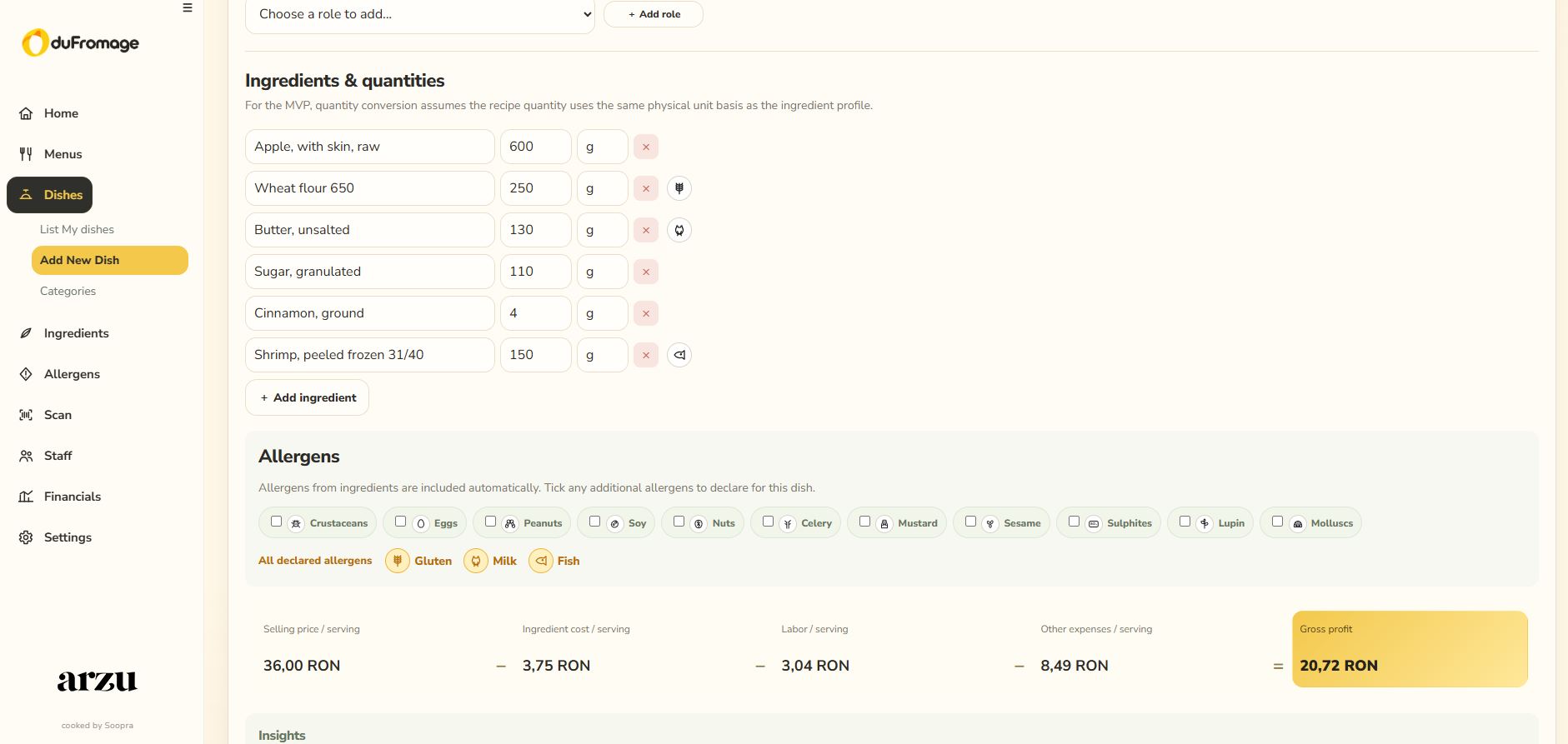
Allergens are visible beside each ingredient in the recipe editor. Allergens already present in the recipe are automatically included in the dish declaration, while the manual selection offers the remaining allergens. Users can add an allergen such as mustard even when it is not represented by a separate ingredient in the library.
The combined declaration stays visible below the ingredient list. This helps teams review the recipe without repeatedly checking another screen. Ingredient information and manual declarations still need to be checked against the products and preparation practices used in the kitchen.
Ingredient-level allergen icons and additional manual declarations help keep recipe information easy to review.
Menus that reuse the recipe information
Users can organize dishes into saved menus and a daily menu, reusing the recipes already defined in the application. Menu views bring together dish information, ingredient costs, nutritional values and allergens.
This connects menu composition with the recipe library: teams can review dishes and edit their underlying recipes without maintaining a separate copy of the same information for every menu.
Saved menus reuse existing dishes and their cost, nutrition and allergen information.
Staff involvement and kitchen capacity
The staff module records team members, roles, costs and skills, alongside shift information and planning tools. Within each dish, users specify the roles involved and the active involvement minutes required for a complete recipe batch.
This makes staff time part of recipe evaluation. Capacity estimates account for staff who share multiple skills, helping avoid counting the same person as fully available for several roles at once. Planning views can help teams identify pressure on particular roles and explore the effect of staff availability.
Team planning connects staff availability and skills with the workload required by the selected dishes.
Sales and expenses that support meaningful reporting
Sales can be recorded by dish or imported from Excel and CSV files using downloadable templates. Users can open a dish directly from the sales list to review its recipe and pricing.
Monthly operating expenses include rent, gas, electricity, water, waste collection, security, cleaning and other costs. Manual revenue entry remains available for restaurants that want to report revenue separately from itemized dish sales.
Dashboard users can switch between sales-based and manually entered revenue, select a reporting period and review gross profit alongside the associated costs. The two monthly summary cards show full-month totals for every month touched by that period; the period-based chart uses the selected dates, with monthly expenses and salaries prorated by calendar days.
The application supports operational analysis rather than statutory accounting. Dish labor and overhead figures are estimates, and gross profit reporting is presented before VAT and income tax.
Sales records and monthly expense inputs provide the data behind the financial dashboard.
A practical application for everyday use
- A complete English or Romanian interface, including ingredient names, with the selected language remembered.
- A remembered dashboard period and a configurable page to open after login.
- Column sorting, search and direct access from dish names to their editors.
- Editable ingredient, recipe, menu, staff and equipment records.
- Local use with a persistent SQLite database and support for PostgreSQL deployment.
- Daily local database backups, manual backup creation and a guarded restoration workflow.
Important financial and planning calculations run on the backend. This keeps the calculation rules centralized while the interface focuses on entering information and presenting the results.
Why it is useful
duFromage helps restaurant teams answer concrete questions before making a change: What does one portion cost? Does the price cover the estimated labor and overhead? Which ingredient dominates the cost? What happens to profit when ingredient prices increase? What can the current team produce?
By connecting those questions to the recipe and sales records, the application gives users a consistent basis for pricing, menu review and kitchen planning. Its value comes from making the relevant numbers available where decisions happen.
See what your recipes reveal
Explore duFromage with your own restaurant workflow. Contact us to arrange free testing and see how ingredient costs, staff involvement and sales information come together in one application.